


 Mark Bassingthwaighte, Risk Manager
4 min read
How to Avoid Getting Hooked by Phishing
 LMG Security : Aug 31, 2021
This blog post is in partnership with LMG Security. With professional hackers and cybersecurity criminals posing a constant threat to law firms...
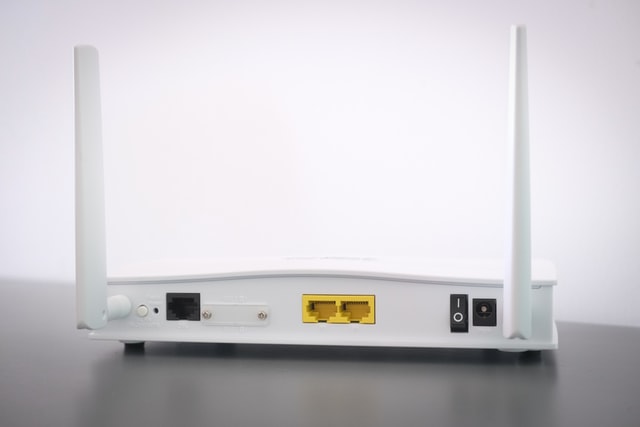
Working from home isn’t an occasional convenience anymore, it’s part of the modern practice of law. Even lawyers who spend most days in the office will check email, review documents, or jump into a quick Zoom call from home. Here’s the problem. While most lawyers understand the need to properly secure office systems, personal devices and home networks don’t always receive the same amount of attention. They fail to appreciate that whenever anyone at the firm works from home, that individual’s home network becomes part of the firm’s risk profile, and one commonly overlooked weak point is everyone’s home Wi‑Fi router.
Why Home Router Security Matters for Lawyers
Remember there is no work from home exception to any of the Rules of Professional Conduct. In fact, several jurisdictions now explicitly require reasonable cybersecurity measures when working remotely. And of course, a breach caused by a home router is still a breach. Even minimal remote work can expose firm systems if a home router is the weak link; and clients aren’t going to care about how or where a breach occurred. Finally, know that cybercriminals do target home networks. Since 2020, attackers have been increasingly focusing on personal and home devices because they’re easier to compromise than office systems.
Here’s the good news. You don’t necessarily need to be an IT professional to secure home routers. You just need to take a few practical steps and couple that with a willingness to follow through. Start by pulling out your instruction manual. If that’s no longer available, instruction manuals are often available online. Just do a search for it using your router make and model number. With that in hand, make sure to address the following recommendations if they have not already been taken care of and don’t hesitate to ask for help from your own IT support if you could use a little assistance. That’s what they’re there for.
Home Router Security Checklist
1. Change the Default Administrative Username & Password because many default credentials are widely known and attackers routinely scan for routers still using them. Use a password manager to create and store a complex password of at least 22 characters comprised of uppercase and lowercase characters, numbers, and symbols. And since many router manufacturers still set the default username as Admin on all their devices, pick a username that’s unique to you.
2. Change Your Wi‑Fi Network Name (SSID) because default SSIDs often reveal your router brand and model, helping attackers identify vulnerabilities. Change it to something unique to you but don’t have it be something that might identify you. As you did with the router’s administrative password, also create a similarly strong network access password using a password manager.
3. Enable a Guest Network in your router settings and give it its own SSID and unique password because allowing visitors’ phones, smart home gadgets, or kids’ devices on your primary home network creates significant additional risk.
4. Update Your Router’s Firmware because attackers target routers running outdated firmware and firmware updates deliver security patches that address that concern. Log into your router’s admin panel and check for updates. Enable auto‑updates if available. If your router doesn’t offer auto‑updates, plan to upgrade soon. If you discover that no updates have been released in the past 12 to18 months, replace the router because that’s a sign the manufacturer has stopped supporting it. As an aside, a general rule of thumb for routers is they should be replaced every 3 to 5 years due to technology obsolescence.
5. Use WPA2‑Personal or WPA3‑Personal Encryption because encryption protects your Wi‑Fi traffic from being intercepted. WPA3 is the current gold standard for Wi‑Fi encryption. WPA2 is still acceptable. Anything older is insecure. If your router only offers older options (WEP, WPA), replace the router post haste.
6. Turn Off UPnP (Universal Plug and Play) in your router settings because UPnP automatically opens ports on your network. While convenient when trying to connect devices to your home network, it’s a gift to attackers. Leaving it on provides attackers an access point that can be used to insert malware on to your network, to include things like programs that seek to capture login credentials to your bank accounts.
Final Thoughts
Securing your home router is a high‑impact, low‑effort step you can take to protect your professional and personal information. Doing so will meaningfully reduce your risk exposure, reinforce your professional obligations, and help ensure the information your clients entrust to you stays protected.


4 min read
LMG Security : Aug 31, 2021
This blog post is in partnership with LMG Security. With professional hackers and cybersecurity criminals posing a constant threat to law firms...

1 min read
 Sharon D. Nelson Esq., Sensei Enterprises : Dec 20, 2022
Did Your Law Firm Survive Thanksgiving?

1 min read
 Mark Bassingthwaighte, Risk Manager : Jun 5, 2019
The belief that a computer or network breach is a ‘when,’ not an ‘if’ is practically dogma now. Given this reality, every law practice, regardless...