
To add an attorney, please click on the situation that best describes your request.
- I am a current ALPS Property & Casualty Insurance Co. policyholder.
- I have a business insurance policy (BOP, Commercial Liability, Higher Limits of Cyber, Commercial Auto, etc).
- I have a lawyers' professional liability insurance policy through ALPS Insurance Agency that is not with ALPS Property & Casualty Insurance Co.
To confirm if your policy is with ALPS Property & Casualty Insurance Co. or another carrier, please look at your declarations page or policy documents.
Current ALPS Property & Casualty Insurance Co. policyholder
To add an attorney to your ALPS legal malpractice insurance policy:
-
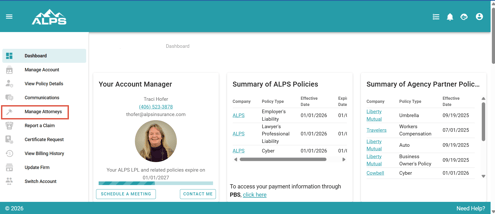
Please log into your ALPS Account Center.
- Click "Manage Attorneys."
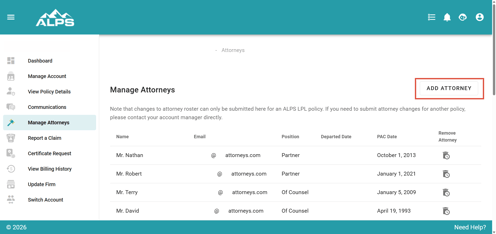
- Click "Add Attorney."
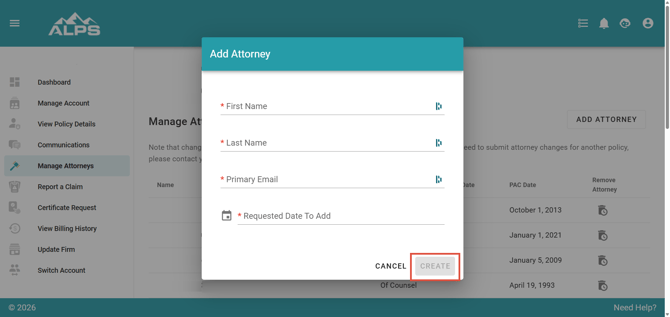
- Fill out the attorney's details and click "Create."
Business insurance policyholders (BOP, Commercial Liability, Higher Limits of Cyber, Commercial Auto, etc)
To add an attorney to any business insurance policy other than lawyers' professional liability insurance, please email your request to Nikki Marlowe, ALPS Business Insurance Customer Service Representative.
Lawyers' professional liability insurance policyholders placed through ALPS Insurance Agency, not insured through ALPS Property & Casualty Insurance Co.
To add an attorney to your lawyers' professional liability insurance policy, please email your request to your account manager. You can find your Account Manager's information on our People page, as well as in the welcome documentation you received when the policy was issued.